


Intermountain Health
4.1723.00 Reviews
App Specs
- Version
- 11.7.2
- Updated On
- License
- Free
- Downloads
- 100,000+
- Developer
- Intermountain Healthcare
- Categories
- Medical
- Platform
- Android
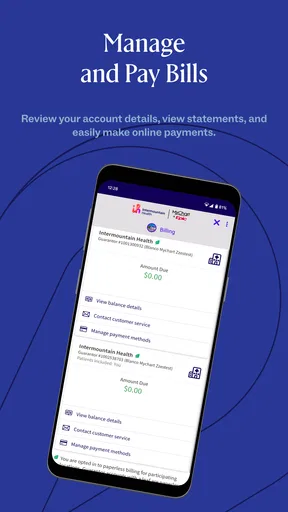
Screenshots

 Analysis by AppCompare
When I want to sort out a health task without making a phone call, I like having a clear place to start. Intermountain Health is a medical app from Intermountain Healthcare, built around access to care and personal health information. It is free, rated for Everyone, and has an average rating of 3.9 from around 1,100 ratings, with more than 100,000 installs. The app first appeared on January 17, 2019, and its current version is 11.7.2, with Android 11 as the minimum operating system. Those details give a sense of an established service, but the more important question is whether its tools fit the way you actually manage care.
Start with one reliable routine
I find a healthcare app most useful when I treat it as a practical organizer rather than a replacement for a clinician. A sensible routine is to open it before an appointment, check the details you need, and then return afterward to review information or handle the next task. That keeps the app connected to real care instead of turning it into another screen to check without a reason.
For someone who already receives care through Intermountain, the main advantage is having several common tasks together: appointment scheduling, medical records, telehealth, and medication-related tools. That can reduce the little bits of friction around care, especially when you are juggling work, family, or multiple appointments. It is less compelling if your providers are elsewhere and you need one universal app for every part of your healthcare.
Make the first visit count
Before relying on any health app in a stressful moment, I would spend a few calm minutes learning where its main sections are. Find the appointment area, look for your records, and understand how to reach the telehealth option. That small orientation matters more than exploring every screen: when you are tired or not feeling well, familiar paths are easier to follow than menus you have never opened.
I would also make sure the account and contact details you use are current. Appointment reminders only help if they reach you, and a telehealth visit is smoother when you are not trying to sort out basic account details at the last minute. This is an everyday preparation step, not a special feature, but it can make the difference between a useful tool and a frustrating one.
What’s Inside the App?
First things first, let’s talk about the layout. The Intermountain Health app is super user-friendly. You don’t need a tech degree to navigate through it, which is refreshing. I mean, who has the time to decode complex apps, right?
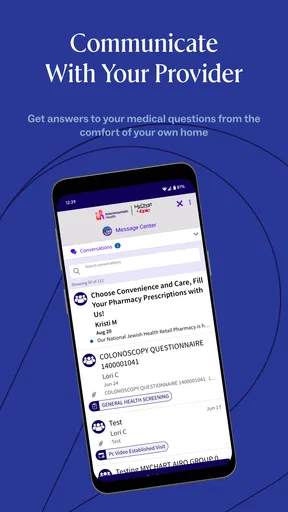
The home screen is pretty intuitive. You’ve got your main options like scheduling appointments, checking out your medical records, and even chatting with healthcare professionals. It’s all laid out in a way that makes sense, even if you’re half-awake at 7 a.m. trying to book a doctor’s appointment.
Worth Reading Before You Choose

EA SPORTS FC Mobile 26 Is a Bigger Football Game, but It Takes Time

Flipboard Shows What News Apps Must Do Beyond the Feed

Switching to Android Auto Means Rethinking Your Driving Routine

Google Calendar Makes a Crowded Week Easier to Manage

Ludo King Makes the Most of the Minutes Between Plans

Baby Panda World Brings Quick Play to Modern Phones, but Its Game Library Feels Busy
Appointment Scheduling Made Easy
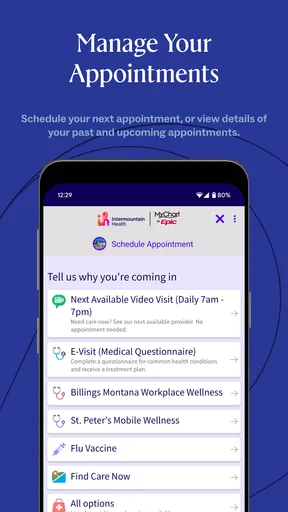
Okay, one of my favorite features has to be the appointment scheduling. Gone are the days of being put on hold for eternity just to see your doctor. With this app, you can check available slots and book appointments right from your phone. It’s like having a direct line to your healthcare provider without the middleman.
Plus, the app sends you reminders so you don’t accidentally miss your appointment. We’ve all been there – forgetting an appointment and having to reschedule. This feature definitely saves you from that headache.
Use scheduling as a planning tool
A useful habit is to check your appointment details when you first book, then revisit them before the day arrives. I would use the reminder as a prompt to prepare questions, note any changes worth discussing, and plan around the appointment rather than as a substitute for checking the actual details. If you are booking for a family member, take care to confirm whose appointment you are viewing before you make plans; a shared phone can make personal health tasks easy to mix up.
There is also a trade-off between convenience and choice. Booking in the app is attractive when the available times suit you, but an urgent concern or a scheduling problem may call for contacting the care team directly instead. An app can make routine booking less of a chore; it cannot ensure that the slot you need is available or decide how quickly a symptom needs attention.
Access to Medical Records
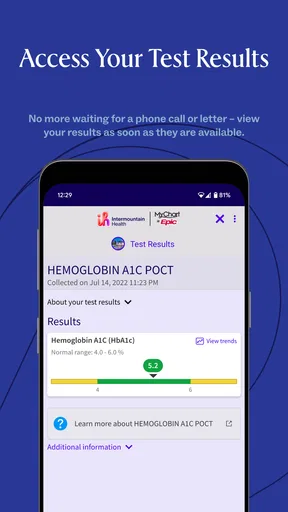
If you’re someone who loves having control over their medical information, you’re going to love this. The app lets you access your entire medical history. You can view lab results, past diagnoses, and even prescriptions. It’s like carrying your medical history in your back pocket.
This feature comes in handy, especially when you need to share information with other healthcare providers or when you’re traveling. Everything you need is just a few taps away.
Read records with the right context
Records are most useful when they help you prepare for a conversation, not when you are left interpreting a result by yourself. If something looks unfamiliar, I would write down the question and bring it to a clinician rather than drawing a conclusion from one number or phrase. Having information at hand can make an appointment more focused, but it does not turn the app into a diagnostic tool.
For a practical travel routine, I would check relevant records before leaving, while I have time to find what I need, rather than waiting until I am in a waiting room with a weak connection or a rushed schedule. The same approach helps when seeing a provider outside your usual care setting: use the app to review what is available, then confirm important details with the clinician who is treating you.
Telehealth Services
Now, let’s talk about the telehealth services. In this day and age, who doesn’t want to have a quick video consult instead of trekking to the clinic? This app offers a seamless telehealth experience. You just pick a time, and boom – you’re face-to-face with a healthcare professional from the comfort of your couch.
The video quality is top-notch, and the entire process is straightforward. Plus, it saves you a ton of time and hassle, especially if you’re feeling under the weather.
Choose the right kind of visit
Telehealth is especially appealing when travel is the hardest part of getting care, or when you want to speak with a professional from home. I would still think through whether a video conversation fits the issue before choosing it. Some concerns are better handled in person, and a clinician may need an examination or other information that a video visit cannot provide. Convenience is valuable, but it should not be the only factor in choosing a care setting.
For a smoother visit, prepare a quiet place, make sure your device is ready, and keep the main reason for the appointment clear in your mind. If you are calling about several concerns, jot them down so the important one does not get lost in the conversation. These simple steps make remote care feel less rushed without assuming that every health issue can be handled on screen.
Medication Management
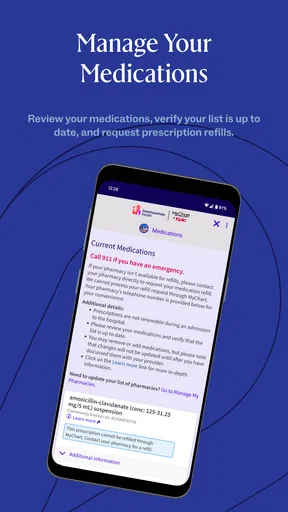
This app also helps you keep track of your medications. You can set reminders for when to take your pills, and it even has a feature to help you refill prescriptions. No more last-minute dashes to the pharmacy because you forgot to refill your meds.
It’s a lifesaver for those of us who have a hard time keeping track of multiple medications. Everything is in one place, and it’s so easy to manage.
Build a safer medication habit
Medication reminders work best as a backup to a routine you already understand. I would use them to prompt a check, not to make a change to a dose or schedule without professional advice. If you take several medicines, keeping the app’s information current and reviewing it when a prescription changes can help reduce confusion, particularly when you are discussing treatment with a clinician.
A refill tool can also help you notice that you are running low before it becomes a same-day problem. I would make that check part of a repeatable habit, such as reviewing medications while preparing for an appointment. It is still worth allowing time for the refill process and confirming any uncertainty with the appropriate care team or pharmacy; a reminder is not a guarantee that a prescription is ready.
Health and Wellness Tips
And here’s a little bonus – the app offers a variety of health and wellness tips. Whether you’re looking for advice on nutrition, exercise, or mental health, there’s something for everyone. It’s like having a health coach at your fingertips.
The tips are practical, easy to implement, and they cover a wide range of topics. It’s a neat little feature that adds extra value to the app.
What to check in settings and habits
I would start by checking the app’s notification settings on the phone and confirming that appointment reminders can reach you. If reminders are disabled at the device level, an otherwise useful routine may quietly fail. At the same time, I would avoid enabling every alert automatically: keep the notifications that help you act on care, and limit distractions that do not fit your needs.
Privacy deserves the same deliberate approach. A phone may be shared or visible to other people, so consider how notifications appear on its lock screen and use the device’s own privacy controls where appropriate. Health information is personal; convenience should not mean leaving sensitive details visible to someone glancing at your screen.
The wellness material is best treated as a starting point for general habits, not personal medical advice. I would use it to find a practical idea to discuss or try when it fits my circumstances, while giving a clinician’s guidance priority when I have a specific condition or treatment plan. That distinction keeps broad tips useful without asking them to do a job they were not designed for.
How it compares with other ways to manage care
Compared with calling an office for every routine task, the app can be more convenient when you want to look for appointment times or review information on your own schedule. Compared with a general health tracker, its stronger fit is access to care and records rather than broad activity tracking. And compared with a provider-neutral records app, it makes the most sense when Intermountain is already part of your care; it is not automatically a complete hub for providers outside that system.
That provider connection is both its clearest strength and its main boundary. If your healthcare is spread across several organizations, you may still need other portals or direct communication to manage everything. If most of your routine care is with Intermountain, keeping appointments and records in one familiar place can be worth more than having a single app that tries to cover every possible service.
Where the convenience has limits
The app is not a substitute for urgent care, emergency services, or a direct conversation when a situation needs immediate attention. I would not wait for an appointment slot or an app response if a health problem feels urgent. For non-urgent questions, the app can help organize the next step; for urgent symptoms, use an appropriate real-world care option.
Another limitation is that a smooth interface cannot remove every administrative wrinkle. Available appointment times, the usefulness of a record, and the right route for a concern depend on the situation. A user who expects one app to solve insurance questions, coordinate every outside provider, or replace all phone calls may be disappointed. I see it as a helpful front door to Intermountain care, not a universal healthcare command center.
Who will get the most from it?
I would recommend it first to people who already use Intermountain services and want a straightforward way to handle ordinary care tasks between visits. It can also suit someone helping a family member stay organized, provided they take care to keep accounts and personal details distinct. The strongest use case is not constant app checking; it is having a familiar place to prepare for care, follow up, and keep routine tasks from slipping.
On the other hand, someone whose clinicians are mostly outside Intermountain may prefer those providers’ own tools or a broader records approach. People who rarely use mobile apps may also find that a phone call is simpler, particularly for an unusual request. The choice is not about being more or less organized; it is about whether the app matches the providers and tasks that matter in your life.
Final Thoughts
All in all, the Intermountain Health app is a fantastic tool for managing your health. It’s packed with features that make life a little easier and a lot healthier. Whether you’re booking appointments, accessing medical records, or having a telehealth consult, it’s all there, ready to go.
If you’re someone who likes having control over your health and wellness, this app is definitely worth downloading. It’s convenient, comprehensive, and just plain smart. So go ahead, give it a whirl, and see how it can transform your healthcare experience.
My verdict after building a routine around it
My practical recommendation is to set it up around the tasks you actually use: keep appointment reminders useful, learn where records live, and check medication details as part of a steady routine. That approach makes the app easier to rely on without expecting it to replace clinical judgment or cover providers who are not part of your care through Intermountain.
If that describes your situation, this is a sensible free app to keep on your phone. I would skip it as a one-stop solution if you need a neutral tool for a complicated mix of healthcare systems, but for routine access to Intermountain care, its value is clear: less hunting for information and a more organized path into the next conversation with a professional.
Pros
- User-friendly interface with intuitive navigation.
- Comprehensive medical records access anytime.
- Seamless appointment scheduling feature.
- Real-time notifications for health updates.
- Integrated telehealth for virtual consultations.
Cons
- Limited offline functionality available.
- Occasional app performance lags.
- Some features require stable internet.
- Limited language support options.
- In-app support could be more responsive.
FAQs for Intermountain Health
What is Intermountain Health and how does it benefit users?
Intermountain Health is a comprehensive healthcare app designed to provide users with easy access to medical services, including appointment scheduling, health records, and telehealth consultations. It benefits users by streamlining healthcare management, offering personalized health insights, and facilitating communication with healthcare providers, ultimately enhancing the overall patient experience.
Is Intermountain Health available on both Android and iOS platforms?
Yes, Intermountain Health is available for download on both Android and iOS platforms. Users can easily find it on the Google Play Store for Android devices and the Apple App Store for iOS devices, ensuring accessibility to a wide range of smartphone users who wish to manage their healthcare needs efficiently.
How secure is my personal health information on Intermountain Health?
Intermountain Health employs robust security measures to protect users' personal health information. The app utilizes encryption and follows industry-standard protocols to ensure data privacy and security. Regular updates and compliance with healthcare regulations further safeguard sensitive information, providing users with peace of mind regarding their data protection.
Can I use Intermountain Health to schedule appointments and access telehealth services?
Yes, Intermountain Health allows users to schedule appointments directly within the app and access telehealth services for virtual consultations with healthcare providers. This feature is designed to provide convenience and flexibility, especially for those who require immediate medical attention or prefer remote healthcare services.
What features does Intermountain Health offer for managing my health records?
Intermountain Health offers a comprehensive suite of features for managing health records. Users can view their medical history, lab results, and immunization records. The app also allows users to update their personal information, ensuring that their healthcare providers have the most accurate and up-to-date data for effective treatment and care.


